KAREOKIE 2 · Free karaoke for Windows

KAREOKIE: AI karaoke for Windows

A karaoke-box screen for your PC. Bring your own audio or video files, or choose an optional music source extension. AI separates vocals from the backing track, syncs lyrics with Japanese furigana, and scores one or two microphones in real time. Song processing runs on your own PC.

  • Windows 10 / 11 (64-bit)
  • Free, no ads
  • Digitally signed

Windows shows a warning when you install?

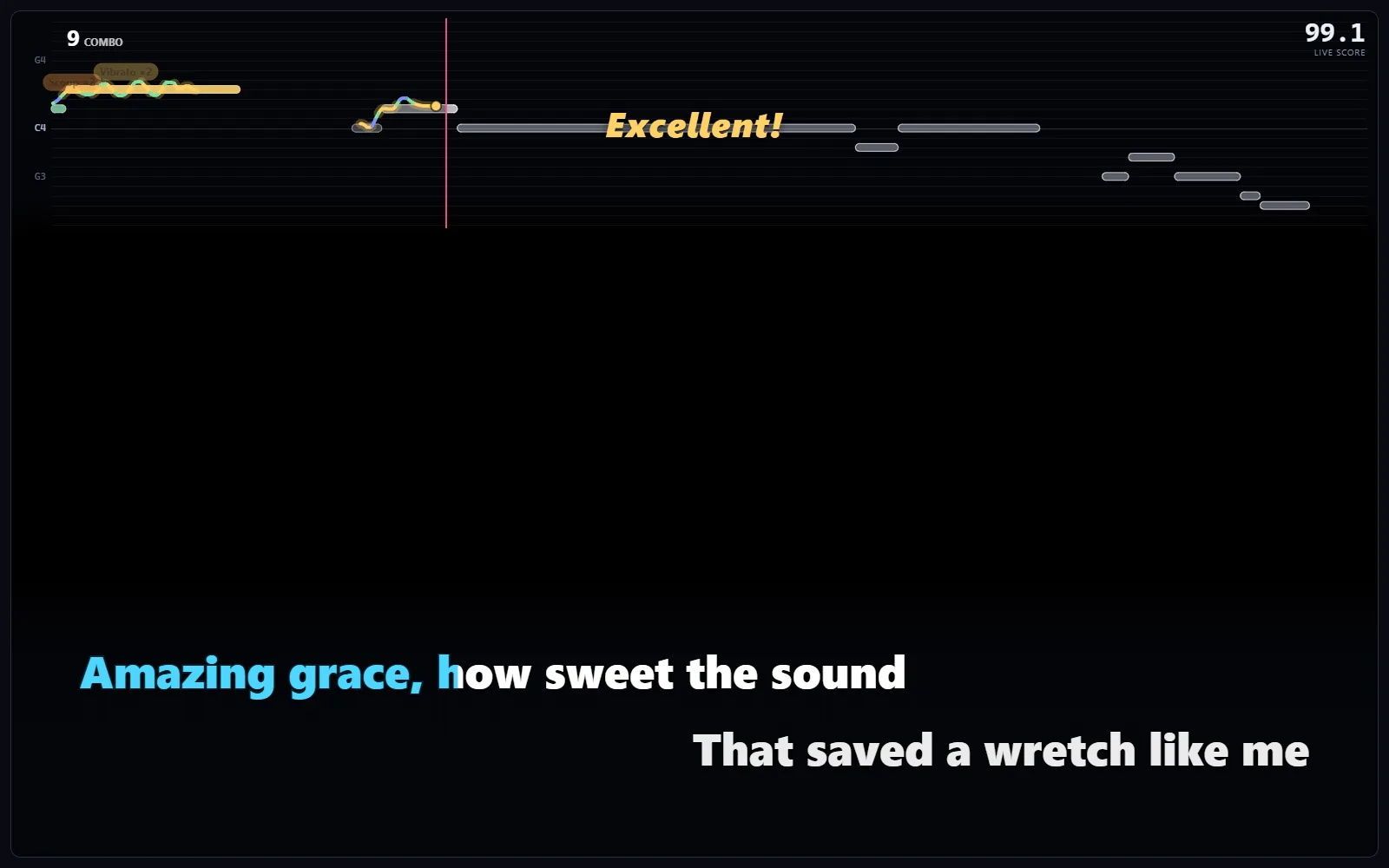
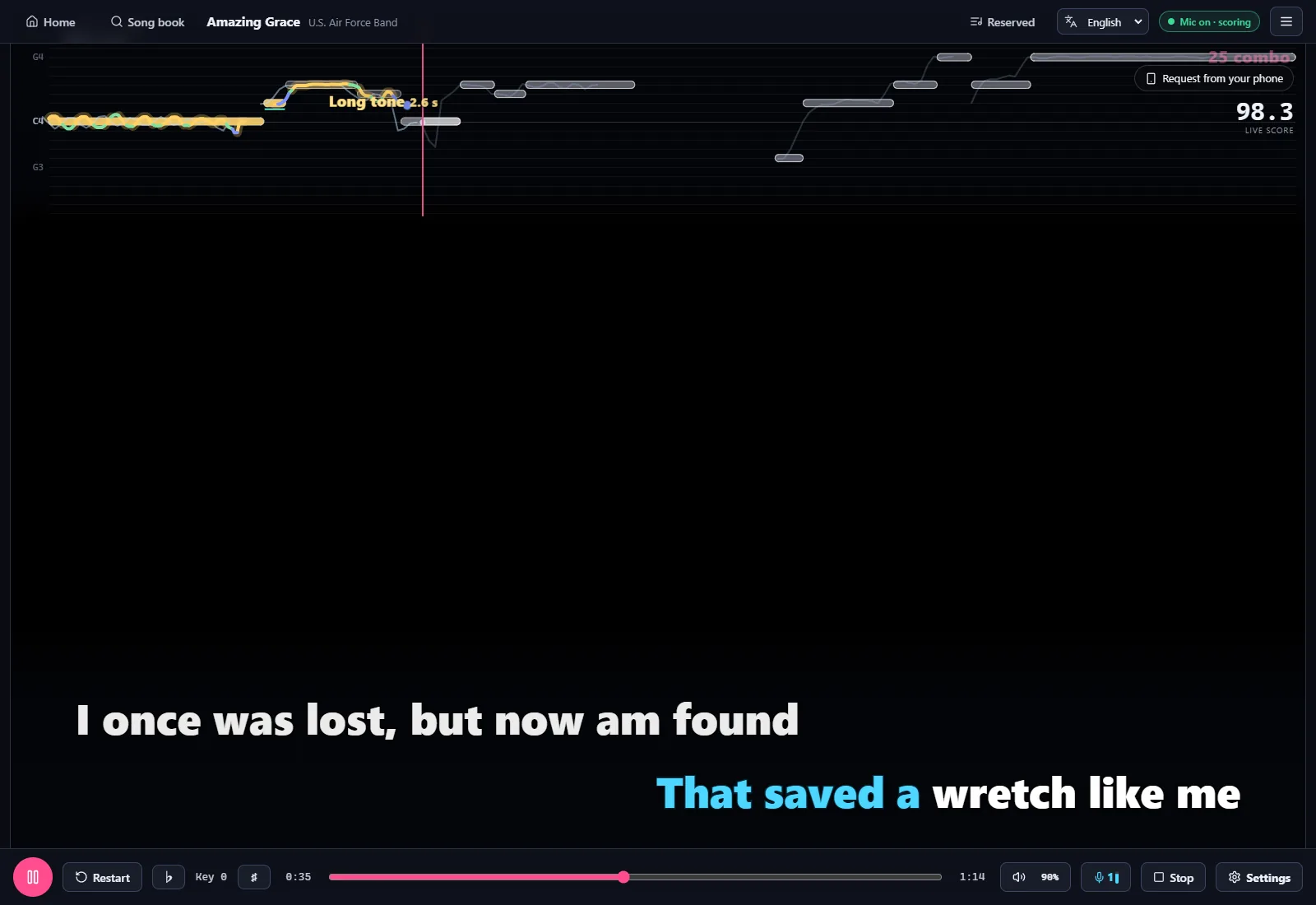
The KAREOKIE singing screen: live pitch line, synced lyrics and live score

No backing tracks or lyric files to hunt down. Pick a song and let the AI do the rest.

KAREOKIE

See it in 10 seconds

Import a song, split the vocals, follow the lyrics and get scored: the whole flow in one short video.

Features

From your music files to your karaoke score

Local files and optional music sources

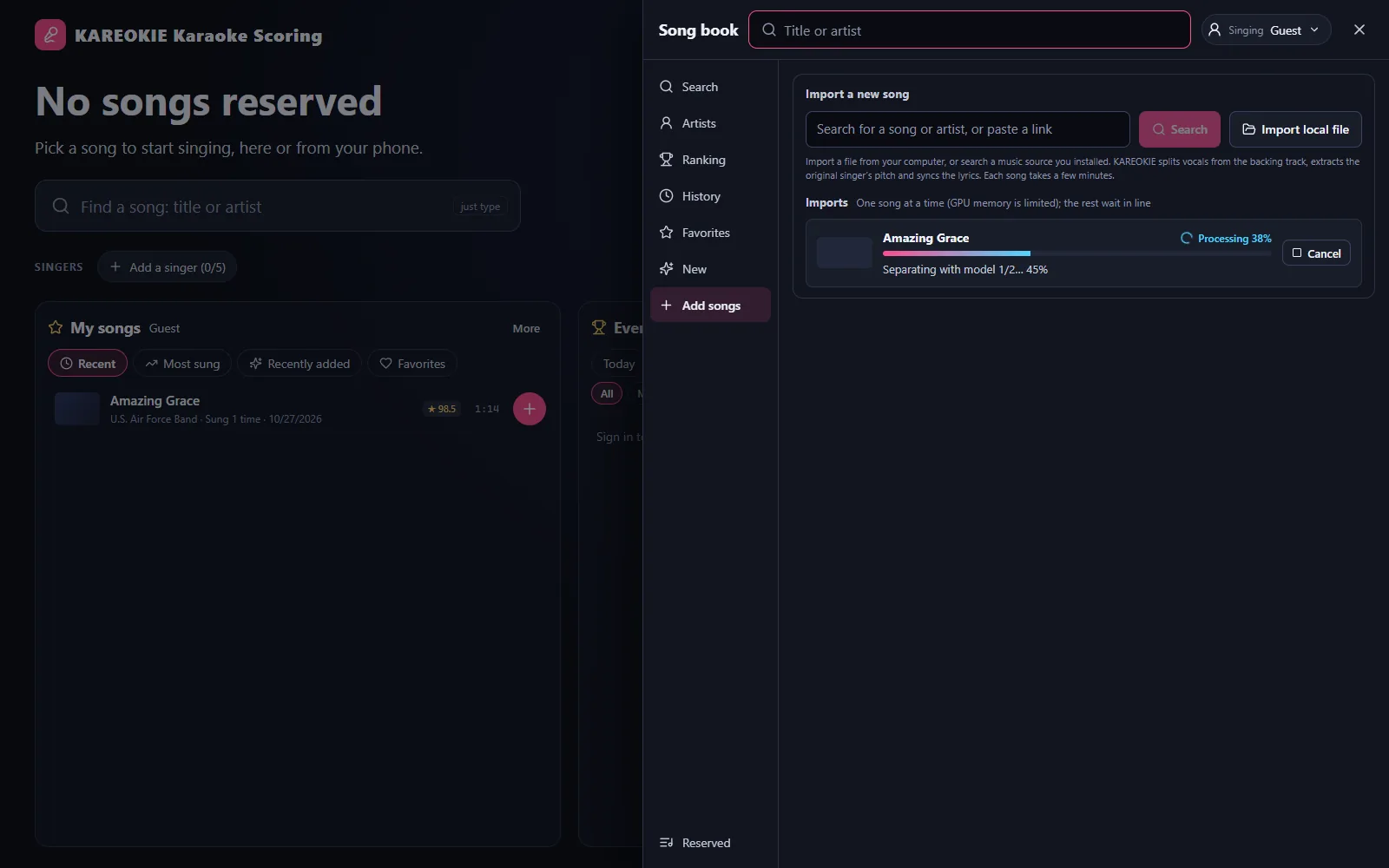
Import an audio or video file you already have, with an optional lyrics file. Online sources are separate extensions, which anyone can build and you choose to install. Imports queue up and process in the background.

Local files and optional music sources

AI vocal separation

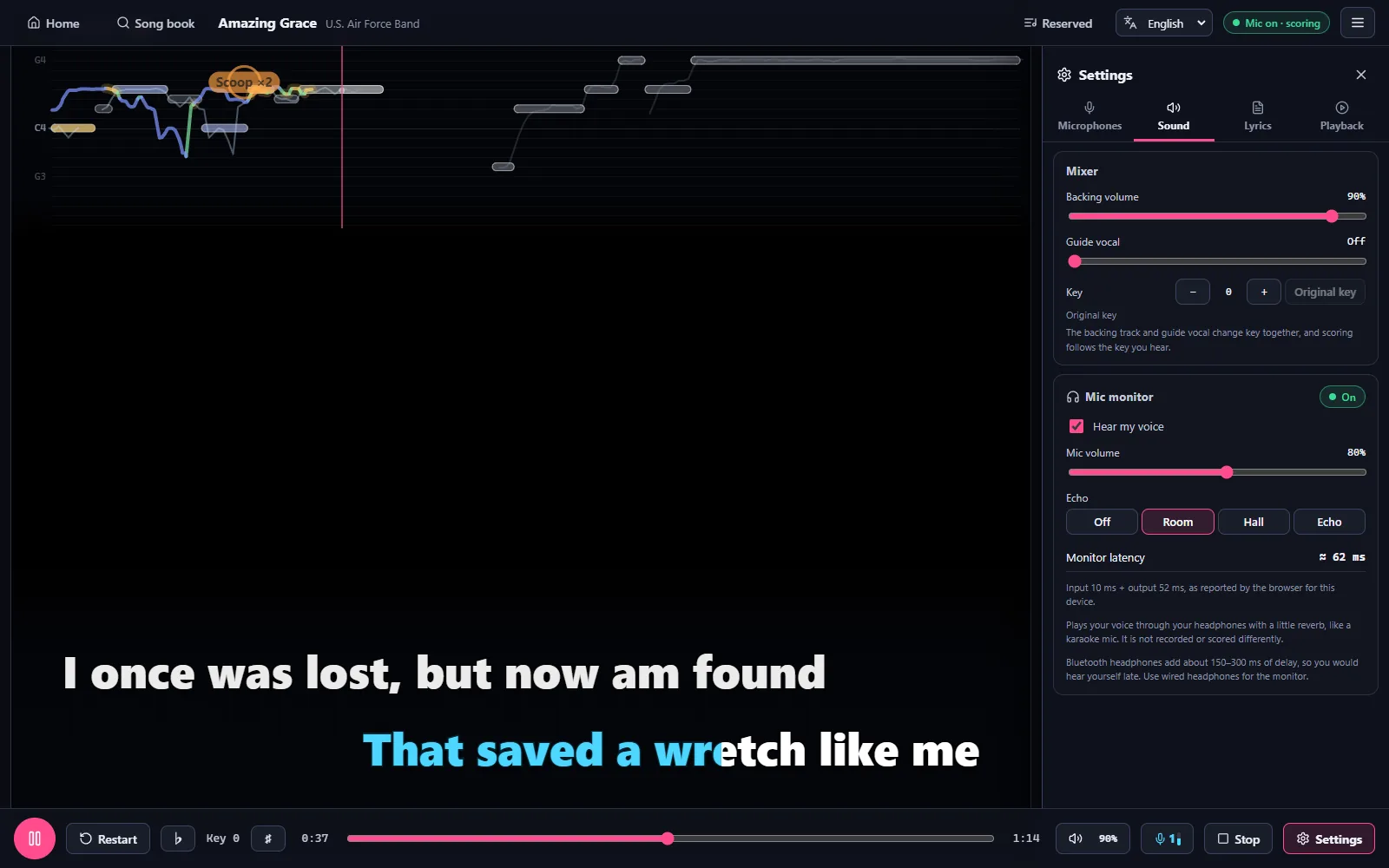
AI splits the original vocals from the backing track. Sing over the instrumental, keep a guide vocal, or switch back to the original at any time, and change the key with ♭ / ♯. With a suitable NVIDIA GPU the high-quality models run; other PCs use a fast model that separates a song in about a minute.

AI vocal separation

Auto-synced lyrics, with furigana

Lyrics are found automatically and timed to the singer’s voice with AI. Japanese lyrics get furigana, and many Japanese songs also get a Traditional Chinese translation. If the timing is off, fine-tune it in the built-in lyrics editor.

Auto-synced lyrics, with furigana

Real microphone scoring

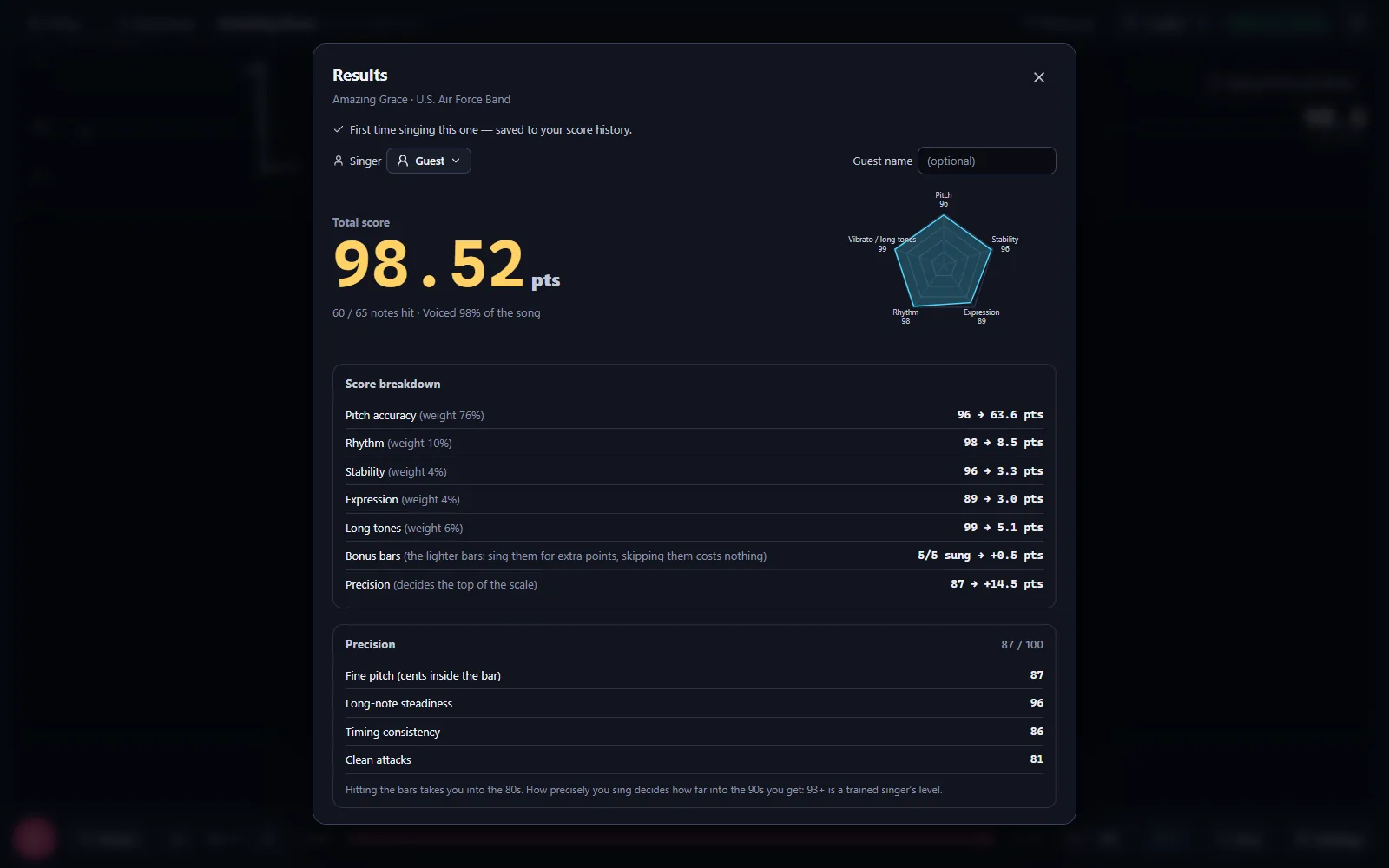
Your pitch is detected live and drawn against the original melody, for one or two microphones at once. Scores follow a karaoke-box scale: 80 means you sang it well, 90 is hard to reach and 93+ is professional.

Real microphone scoring
  • A karaoke-box screen

    Browse the song book, choose who sings, then reserve, insert next or play now. The next song starts by itself.

  • Two microphones

    Two singers are scored at the same time, with two USB mics or a twin wireless receiver.

  • Members and history

    Everyone who sings on your PC gets their own profile and singing history.

  • Leaderboards and titles

    Scores go on the online leaderboards, and the top singers earn a monthly title.

  • Phone remote

    Scan the QR code on the stage to pick songs, reserve them and control playback from your phone, on any network.

  • Discord community

    Link Discord and join the KAREOKIE server in one click to sing without a daily limit.

  • 繁體中文 · 日本語 · English

    Three UI languages; it follows your Windows display language by default.

  • Your songs stay on your PC

    Songs and audio are processed and stored on your computer and never uploaded. Score summaries go to our server for your records and the leaderboards.

Get started

How to practice karaoke on your Windows PC

KAREOKIE combines AI vocal separation, synced lyrics and microphone pitch scoring in one free Windows app.

  1. Install KAREOKIE and finish setup

    Download the Windows installer. On first launch, let the app install its AI runtime, accept the terms and sign in with Google. A suitable NVIDIA GPU runs the high-quality separation models; other PCs use the fast model, with the same features.

  2. Import a song and let AI prepare it

    Choose an audio or video file from your computer. For an online source, first install an extension from the Extensions page. Wait for vocal separation, lyric alignment and melody analysis to finish; processing time depends on your PC.

  3. Connect a microphone and sing

    Choose one or two microphones, reserve a song from the song book and follow the lyrics and pitch guide. Your live pitch is compared with the original melody, and your score appears when the song ends.

Requirements

System requirements

No graphics card needed: without a suitable NVIDIA GPU, KAREOKIE uses CPU mode with a fast separation model.

Operating system
Windows 10 / 11 (64-bit)
Graphics
Optional. GPU mode needs an NVIDIA GeForce GTX 16 / RTX 20 series card or newer with 6 GB+ of graphics memory and driver 570 or later. Without one, CPU mode separates each song in about a minute with a fast model, at slightly lower separation quality. Switch between GPU and CPU mode in Settings.
Disk space
AI runtime: about 6 GB (GPU) or 2.5 GB (CPU), plus about 3 GB for the AI models. Songs are extra; set a limit in Settings (20 GB by default).
Internet
Required: you sign in with Google, and the first start downloads the AI runtime (about 3.5 GB for GPU, 1 GB for CPU). Interrupted downloads continue where they stopped.
Microphone
Any microphone Windows can use (USB mic, headset, wireless mic). For two singers: two microphones, or a twin wireless receiver.

FAQ

Frequently asked questions

Windows says “Windows protected your PC”. What do I do?

KAREOKIE is digitally signed, so Windows shows a verified publisher name instead of “Unknown publisher”. A new release can still get this Windows SmartScreen warning while its signature builds up download reputation. It does not mean a virus was found. Two steps to continue:

  1. Click “More info”.
  2. Check that the app is KAREOKIE-Setup-x.y.z.exe and that a publisher name is shown, then click “Run anyway”.

If “Publisher” says “Unknown publisher”, the file isn’t the signed KAREOKIE installer: don’t run it. Only download the installer from this site or the GitHub downloads page. In-app updates never show this screen.

If your browser (Edge, Chrome) says the file “isn’t commonly downloaded”, choose “Keep”.

Is it really free?

Yes. Every feature is free, with no ads and no credit card. You sign in with a Google account.

Without Discord you can sing 10 songs a day. Link your Discord account and join the KAREOKIE Discord server (both free, one click in the app under Account → Discord) to sing without a daily limit.

If paid plans are ever introduced they will be announced clearly in advance, and any change to free features will be announced in the app first.

What does my score mean?

KAREOKIE 2 scores like a karaoke box: 80 means you sang the song well, 90 is hard to reach and 93 or more is professional. The lyrics decide where you have to sing; extra notes outside them can only add points. If nobody sings, there is no score.

With two microphones both singers are scored; microphone 1 is the main singer and goes on the leaderboard. Scores from versions before KAREOKIE 2 are on an earlier scale, so they are kept and shown separately.

Do I need an NVIDIA GPU? What’s the difference between GPU and CPU mode?

No. On first start the app checks your PC. With a suitable NVIDIA GPU (GeForce GTX 16 / RTX 20 series or newer, 6 GB+ of graphics memory, driver 570 or later) it installs the GPU version and uses GPU mode; otherwise CPU mode.

Both modes have the same features. GPU mode separates vocals with the high-quality models. CPU mode uses a fast model that takes about a minute per song; the backing track can keep a little of the original vocal. AMD and Intel graphics use CPU mode.

Switch between GPU and CPU mode in Settings (Import and playback quality). If the CPU version of the AI runtime is installed on a PC with a suitable NVIDIA GPU, choose Settings → “Reinstall the AI runtime…” and pick the GPU version.

How much does the first start download?

The installer is about 160 MB. On first start the app downloads and installs the AI runtime, with a progress screen:

  • GPU version: about 3.5 GB download, about 6 GB installed (about 6 minutes on a 100 Mbps connection)
  • CPU version: about 1 GB download, about 2.5 GB installed

The AI models (about 3 GB) download the first time you import a song. If the connection drops, the download continues where it stopped; if setup fails, “Retry” continues from the step that failed.

Where is my data stored? Is anything uploaded?

Everything lives in %LOCALAPPDATA%\KAREOKIE:

  • data: songs, singing history, members
  • runtime: the AI runtime
  • logs: log files (useful when something goes wrong)

Songs, audio and member profiles stay on your PC. Your microphone audio and the audio you import are never uploaded. A summary of each scored song (title, score, date) goes to our server for your records and the leaderboards, and the app also sends usage statistics and automatic crash reports. See the privacy policy for details.

How do updates work?

No need to come back here. The app checks for updates when it starts and every 6 hours. When a new version is out, a notice appears in the top-right corner; click “Update now” and it downloads, installs and restarts on its own. It never interrupts a song — it waits until the song ends.

You can also check manually in Settings → Check for updates. Some updates are required, like KAREOKIE 2: a version that is no longer supported asks you to update before you can keep singing.

How do I uninstall it?

Open Windows Settings → Apps → Installed apps, find KAREOKIE and choose “Uninstall”.

So you never lose your songs and history by accident, uninstalling keeps your data. To remove everything, also delete the %LOCALAPPDATA%\KAREOKIE folder by hand (it holds the AI runtime and your songs, and can be several GB).

Is there a Mac or Linux version?

Not yet: only Windows 10 / 11 (64-bit).

Changelog

Changelog

  1. KAREOKIE 2 v0.2.0

    • KAREOKIE 2: a new karaoke-box look. Browse the song book, choose who sings, then reserve, insert next or play now. The reserved list stays one tap away
    • While you sing, the controls get out of the way and come back when you move the mouse. Long instrumental endings are cut short, and the next song starts by itself after 5 seconds
    • Phones join from a small QR code in the corner of the stage. Fold it away when you don't need it
    • New scoring: 80 means you sang it well, 90 is hard to reach and 93+ is professional. The lyrics decide where you have to sing; extra notes outside them can only add points. If nobody sings, there is no score
    • Two microphones: two singers are scored at the same time. Microphone 1 is the main singer and goes on the leaderboard
    • The microphone is on from the moment a song loads, and a song starts only once its lyrics are ready
    • Japanese songs: more accurate readings above the kanji, and Traditional Chinese translations for many songs. A music video's English subtitles no longer end up as the lyrics
    • Discord: link your account and join the KAREOKIE server in one click. Linked accounts sing without a daily limit; without Discord you can sing 10 songs a day
    • Monthly singer titles for the top singers, shown in the app and as roles on the Discord server
    • The home screen shows your songs next to what everyone is singing, plus a notice board for news
    • PCs without a suitable NVIDIA graphics card use the fast separation model. You can switch between GPU and CPU mode in Settings
    • If Windows Smart App Control blocks part of KAREOKIE, the app now tells you what happened and what you can do
    • KAREOKIE is digitally signed, first-time setup and model downloads continue after a dropped connection, and the key can be changed with ♭ / ♯ in the playback bar
    • Faster live scoring, stronger protection against cheating and tampering, and crash reports that help us fix problems sooner
    • Updated Terms of Service and Privacy Policy. You'll be asked to accept them once. The option to stay off the score rankings is gone
    • This version is required: earlier versions stop working once KAREOKIE 2 is out
  2. v0.1.14

    • Fixed: the first-time AI setup could stop with "operation not permitted" when antivirus software was still scanning the newly unpacked files. Setup now waits and tries again
    • Fixed: the first-time AI setup could stop while unpacking ffmpeg ("Can't restore time")
    • When Windows Smart App Control blocks a tool that KAREOKIE needs, setup now says so plainly instead of showing an error number
  3. v0.1.13

    • Songs imported before 0.1.12 are now made smaller by themselves: a few minutes after KAREOKIE starts, it converts them to the compact format in the background, one song at a time, while you keep using the app. Scores don't change. You can follow it, or stop it, in Storage → Compact library
Older versions (13)
  1. v0.1.12

    • Songs take about 5 times less space: new imports keep their tracks in a compact high-quality format (about 30 MB a song instead of about 165 MB). Songs you already have keep working; Storage → "Compact library" shrinks them too, in the background
    • Key-change copies of songs now stay under 1 GB in total; the oldest are cleared by themselves
    • New: sing against yourself. A faint line shows your best (or last) run of the song, and a small badge tells you live whether you are ahead of it
    • New: live feedback while you sing: techniques such as turns, scoops, falls and vibrato pop up as you sing them, each line gets a grade (Excellent / Great / Good / OK) and a combo counts your streak
    • Scoring: the expression bonus now rewards your own expression (vibrato, long-note control, ornaments, dynamics) instead of how close you are to the original singer
    • Many small screen fixes: history charts stay inside their cards, the queue tab no longer covers buttons, a missing song no longer crashes the stage, and more
  2. v0.1.11

    • Fixed: if the AI separation model's first download was interrupted (the app closed, the connection dropped), every import afterwards failed with "Couldn't load separation model … (the file may be corrupt)". KAREOKIE now notices, downloads the model again by itself and carries on
    • If Windows' Smart App Control blocks a tool KAREOKIE needs, the import now says so in plain words instead of showing a Windows error code
  3. v0.1.10

    • New: move your songs and the AI runtime to another folder or drive (for example D:) in Settings → Data folder → Move…. KAREOKIE moves everything, checks it and restarts from the new place
    • Fixed: after deleting an imported song, "Start singing" on its import could crash the screen again and again. The button is gone for deleted songs, and opening a missing song shows a message instead of crashing
    • Deleting a score from your history now also takes your name off it on the leaderboards: the score stays there as "Anonymous"
    • If a song's download arrives incomplete, KAREOKIE downloads it once more by itself, and otherwise says clearly what went wrong
    • Fixed: wired headsets were taken for Bluetooth and showed the Bluetooth warnings
    • Scoring: notes you didn't reach or skipped count as 0 when the whole song is scored
  4. v0.1.9

    • Fixed: in 0.1.8 every song import failed with "Couldn't decode the audio … received no packets". The audio tools bundled with 0.1.8 lack one resampling component; KAREOKIE now switches to another high-quality one by itself. Nothing to download again: update and import as usual
    • Fixed: changing the key could fail for the same reason
  5. v0.1.8

    • Security: KAREOKIE's local engine now answers only the KAREOKIE window. Web pages you visit and other programs or accounts on your computer can no longer use it
    • Security: installing an extension that isn't signed by KAREOKIE now asks you in a Windows dialog
    • Security: removing an extension can only ever delete that extension's own folder
    • Security: the AI runtime downloads (Python packages and ffmpeg) are now pinned to exact versions and checked file by file
    • Updated the app framework (Electron) with its latest security fixes
    • After this update the setup screen shows for about half a minute while the AI runtime is checked. Nothing is downloaded
  6. v0.1.7

    • Fixed: after signing in, the app could stay on "Connecting" forever when the computer's clock was wrong (common on PCs that also run Linux). KAREOKIE now goes by the server's time, and if the clock is far off it tells you how to turn on "Set time automatically"
    • Fixed: "Speech recognition" in the lyrics panel kept the original lyrics. It now uses the words actually sung, in readable lines
    • The leaderboard shows more than the top 50: "Show more" loads further songs, down to #1000
    • New totals on the leaderboard, in the library and on the website: how many times songs were sung, and how many songs were imported
    • Songs imported with KAREOKIE's official source extensions are counted, once per person and song, for the public import totals. Local files and other extensions are never reported
    • Phone remote now always works over the internet (any network, no need for the same Wi-Fi). The connection closes by itself after 30 minutes without a phone
    • Fixed: picking a data folder with a very long path is refused before anything is moved
    • Updated Privacy Policy (version 4): import records for the public import totals. You'll be asked to accept it once
  7. v0.1.6

    • The installer asks where to install. Installed on another drive (for example D:), the AI runtime and your songs go to that drive too, and the first-start screen lets you pick another folder
    • Fixed: imports failing with "Unrecognized option 'hide_banner'" on PCs with an old ffmpeg. KAREOKIE now always uses its own ffmpeg
    • If Windows lacks the Microsoft Visual C++ runtime the AI needs, setup installs it (Windows asks for permission once)
    • Fixed: on some PCs the window stayed completely black on first start. It happened where another program had registered .js files as plain text in Windows
    • If the window ever stays empty, KAREOKIE now says so and offers to reload or to restart without graphics acceleration
    • Crash reports are now on by default (still without your songs, lyrics or personal data) and can be switched off in Privacy & diagnostics. Memory snapshots of program crashes (minidumps) are sent only if you turn them on
    • Long lyric lines shrink to fit the stage instead of being cut off
    • The library shows how many times KAREOKIE has been downloaded
    • Updated Privacy Policy (version 3): crash reports on by default, minidumps only if you turn them on. You'll be asked to accept it once
  8. v0.1.5

    • Faster imports from online sources, with exactly the same result: about 20% quicker (for example 112 → 90 s), because models load in the background while the GPU works and part of the vocal separation runs on a faster, bit-identical path
    • The library shows how many people have installed KAREOKIE and how many are online now (totals only)
    • Updated Privacy Policy (version 2): the anonymous install count, and what the online phone remote sends through our server. You'll be asked to accept it once
  9. v0.1.4

    • Updated Terms of Use (version 2): KAREOKIE is copyrighted software, and decompiling, reverse engineering or copying its code is not permitted. You'll be asked to accept the new version once
    • The app's files now carry a copyright notice
  10. v0.1.3

    • Phone remote from anywhere: the phone no longer needs to be on the same Wi-Fi. Open "Phone remote" → "Anywhere (internet)", then scan the QR code or open kareokie.pages.dev/remote and type the 6-digit PIN. The phone reconnects by itself after locking or reloading; "Stop remote" ends access for every phone
    • Only commands, the song list and the playback state go through our server (kept in memory, never stored); no audio is sent. The "Same Wi-Fi" mode still works offline
  11. v0.1.2

    • Fixed: when installing a source extension, the "first time using this source" statement opened behind the install window, so the install couldn't go on
  12. v0.1.1

    • Friendlier scoring: if you follow the melody you now score noticeably higher (about 60 instead of 35 for a rough run), and varied techniques (slides, runs, falls, vibrato) earn an expression bonus of up to 5 points
    • If the mic picks up almost nothing, the run says "Couldn't score" instead of giving a tiny number, and isn't saved
    • The "no mic signal" banner lets you switch to another mic right away, and comes back if the problem continues
    • Smoother pitch line: no more octave flips or short spikes
    • Faster first-time setup (about 2.5 minutes instead of 6.5 on a fast connection) with real progress while unpacking
    • Fixed: vocal separation failing ("audio-separator is missing"), the phone remote not connecting, and online lyric search being skipped
    • Fixed: your settings (mic, latency, volumes) being reset after turning on the phone remote
  13. v0.1.0

    First release of the KAREOKIE desktop app:

    • Import your own music files, or install a music source extension (online sources are free, separate extensions)
    • AI vocal separation, lyrics timed to the singer's voice (Japanese furigana), real microphone scoring
    • Singing analysis that shows your recurring problems, members and history, live leaderboards
    • Google sign-in; the first start installs the AI runtime (NVIDIA graphics detected automatically)
    • Auto update, phone remote (local network, off by default), Traditional Chinese / Japanese / English UI

Ready to sing?

Download it free, plug in a mic, and tonight’s the show.