KAREOKIE는 음악을 제공하거나 호스팅하거나 다운로드하지 않아요. 직접 가져온 오디오·영상 파일로 보컬 분리, 가사 싱크, 노래 점수를 처리하는 소프트웨어예요.

KAREOKIE 3 · Windows용 무료 노래방

KAREOKIE: Windows용 AI 노래방

PC에서 즐기는 노래방 화면이에요. 가지고 있는 오디오·영상 파일을 가져오거나, 선택 사항인 음악 소스 확장 프로그램을 골라 보세요. AI가 보컬과 반주를 분리하고, 일본어 후리가나가 붙은 가사를 싱크에 맞춰 보여 주고, 마이크 1~2개를 실시간으로 채점해요. 노래 처리는 내 PC에서 이루어져요.

  • Windows 10 / 11 (64비트)
  • 무료, 광고 없음
  • 디지털 서명 완료

설치할 때 Windows 경고가 뜨나요?

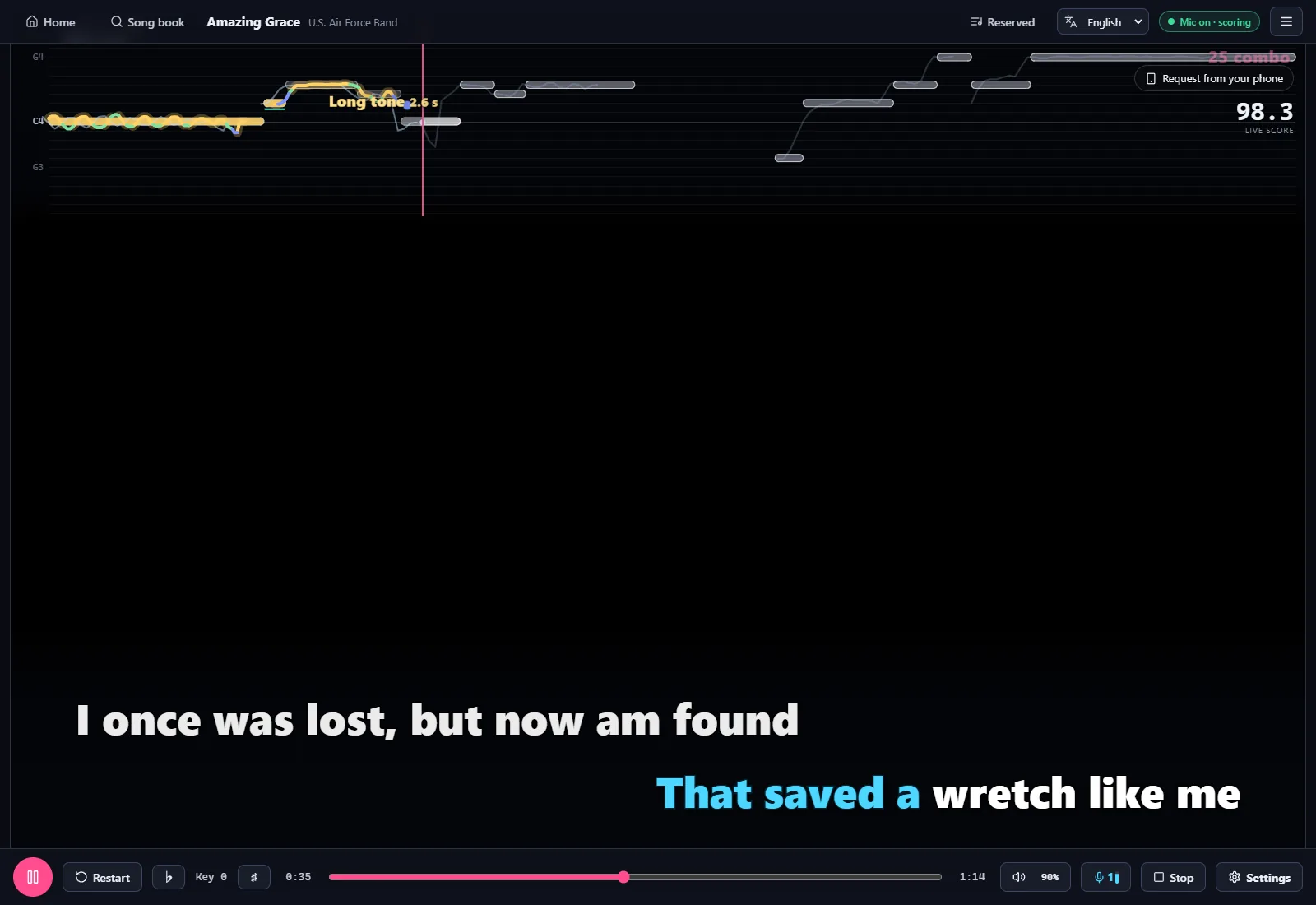
KAREOKIE 노래 화면: 실시간 음정 선, 싱크 가사, 실시간 점수

반주나 가사 파일을 찾아다닐 필요가 없어요. 노래만 고르면 나머지는 AI가 해요.

KAREOKIE

10초 만에 둘러보기

노래를 가져오고, 보컬을 분리하고, 가사를 따라 부르고, 점수를 받는 전체 과정을 짧은 영상 하나로 보여 드려요.

기능

내 음악 파일에서 노래방 점수까지

로컬 파일과 선택형 음악 소스

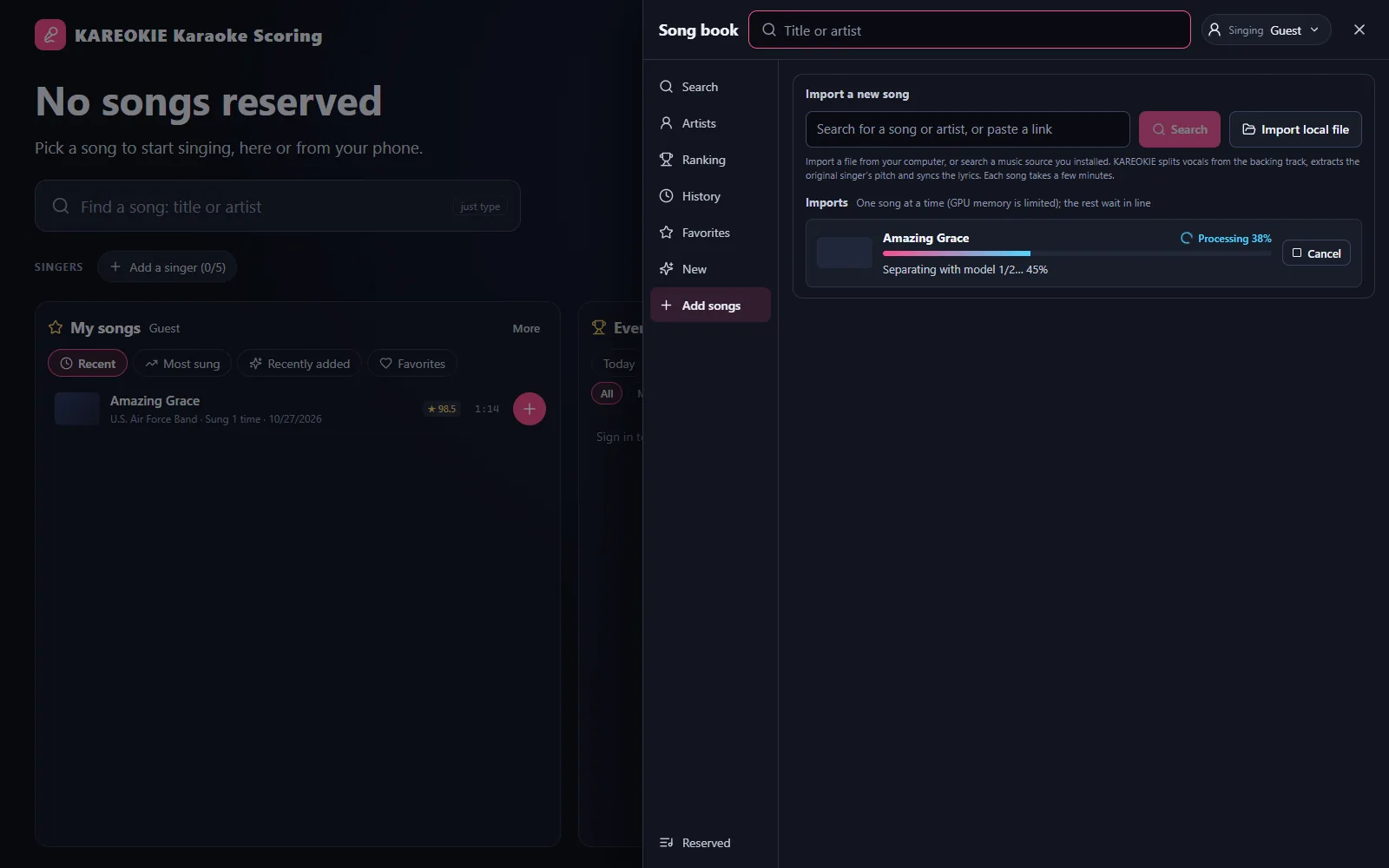
이미 가지고 있는 오디오·영상 파일을 가져와요. 가사 파일도 함께 넣을 수 있어요. 온라인 소스는 별도의 확장 프로그램이고, 누구나 만들 수 있으며 설치 여부는 직접 정해요. 가져온 노래는 순서대로 대기하고 백그라운드에서 처리돼요.
로컬 파일과 선택형 음악 소스

AI 보컬 분리

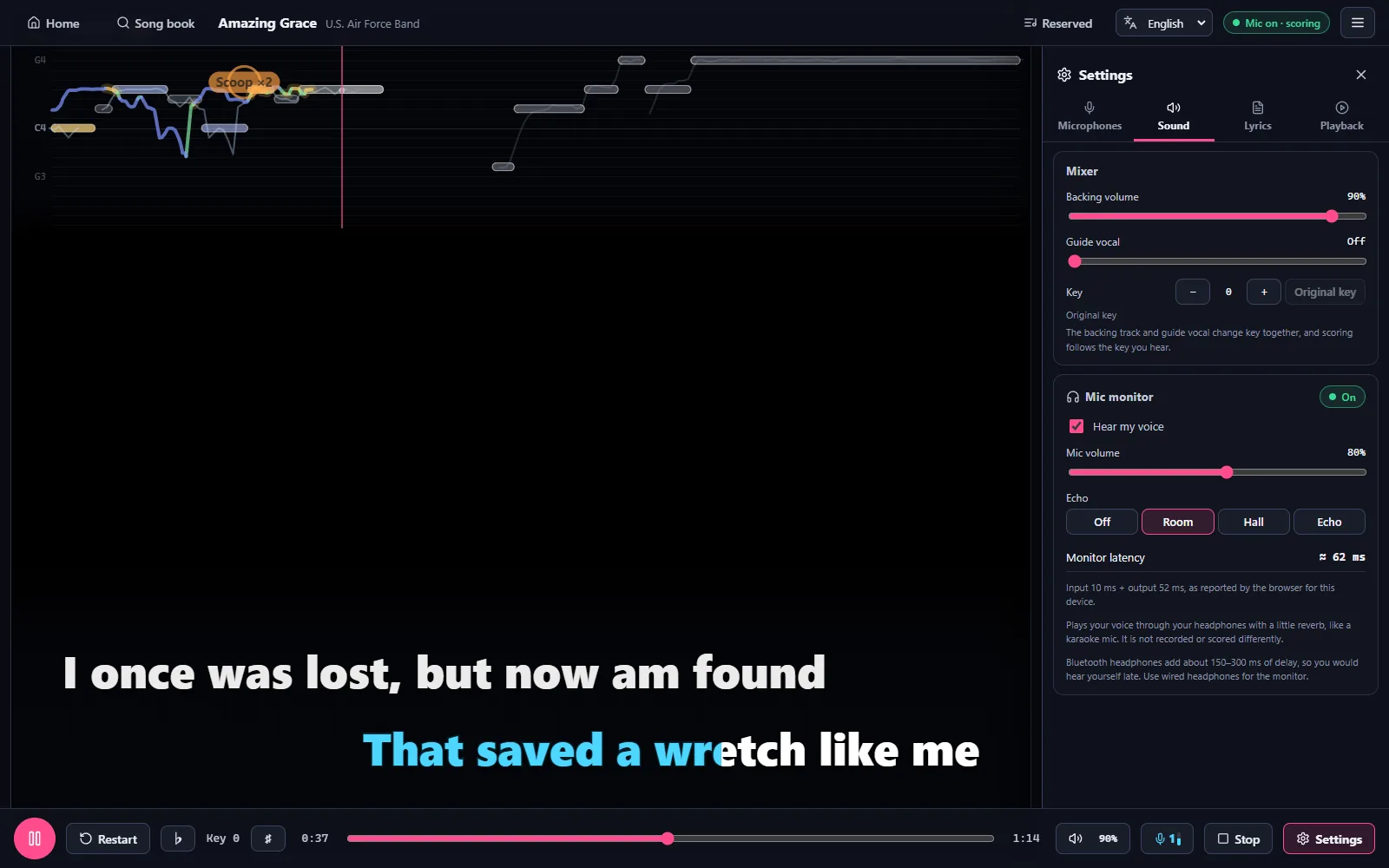
AI가 원곡 보컬과 반주를 나눠 줘요. 반주에 맞춰 부르거나, 가이드 보컬을 남기거나, 언제든 원곡으로 되돌릴 수 있고, ♭ / ♯로 키도 바꿀 수 있어요. GPU에서는 KAREOKIE 자체 분리 모델이 이전보다 약 3~4배 빠르게 노래를 준비하고, 그 외 PC에서는 노래 한 곡을 약 1분 만에 분리하는 빠른 모델을 사용해요.
AI 보컬 분리

후리가나가 붙은 자동 싱크 가사

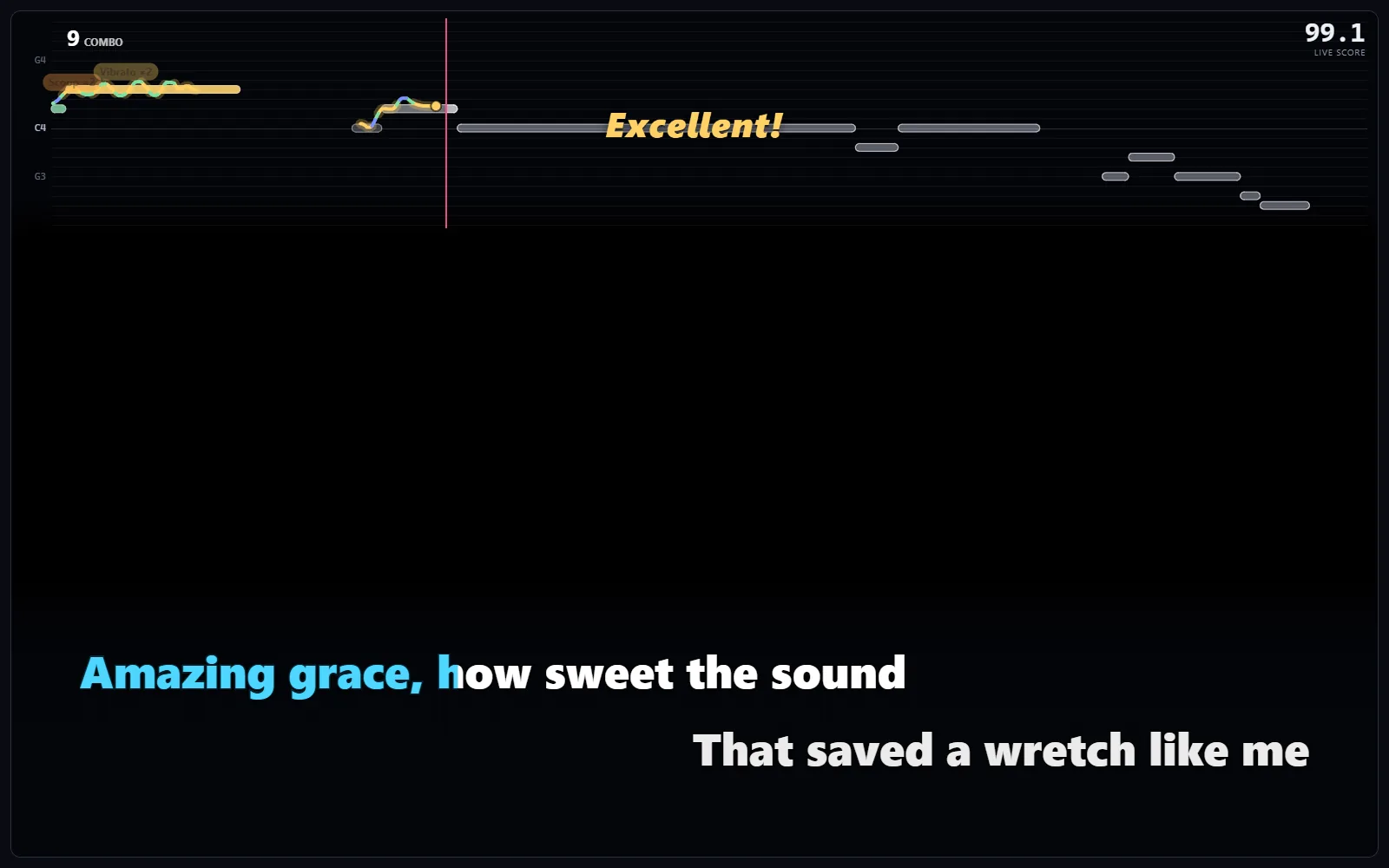
가사를 자동으로 찾아서 AI로 가수의 목소리에 맞춰 타이밍을 잡아요. 일본어 가사에는 후리가나가 붙고, 많은 일본 노래에는 번체 중국어 번역도 제공돼요. 타이밍이 맞지 않으면 내장 가사 편집기에서 세밀하게 조정할 수 있어요.
후리가나가 붙은 자동 싱크 가사

실제 마이크 채점

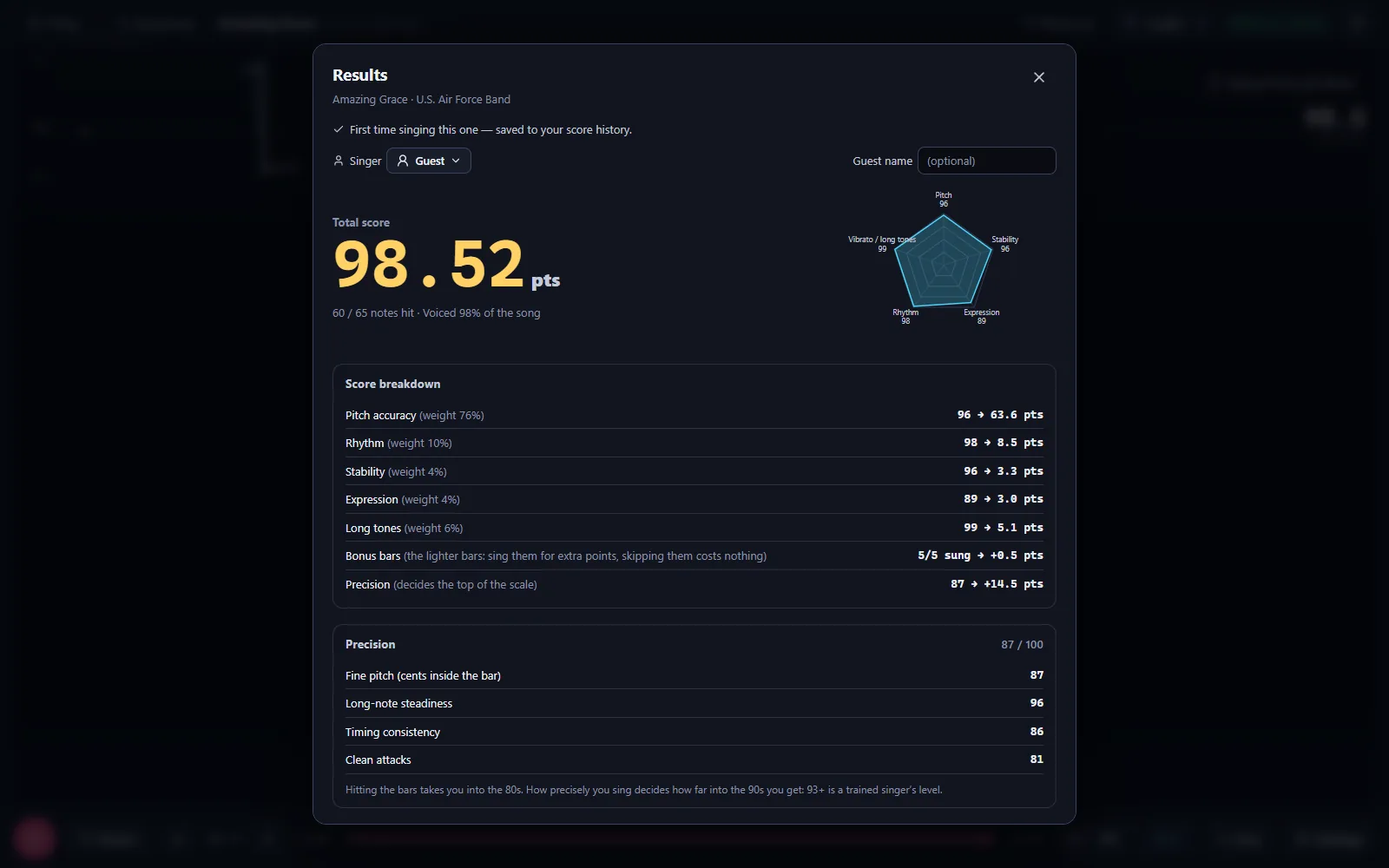
내 음정을 실시간으로 감지해서 원곡 멜로디와 함께 그려 줘요. 마이크 1~2개를 동시에 사용할 수 있어요. 점수는 노래방 기준이에요. 80점이면 잘 부른 거고, 90점은 닿기 어렵고, 93점 이상은 프로 수준이에요.
실제 마이크 채점

연습 모드

가사에서 원하는 부분을 골라 반복해요. 매번 부른 것을 다시 듣고, 음이 어긋난 단어를 확인하고, 음높이는 그대로 두고 느리게 연습할 수 있어요.

  • 노래방 화면

    노래책을 둘러보고, 부를 사람을 고른 다음 예약하거나, 다음에 넣거나, 바로 재생해요. 다음 노래는 알아서 시작돼요.

  • 신청곡 창

    별도의 창에서 노래를 검색하고, 예약하고, 순서를 바꿀 수 있어요. 두 번째 화면에 띄워 두면 누가 노래하는 동안에도 가사가 가려지지 않아요.

  • 휴대폰 리모컨

    무대 화면의 QR 코드를 스캔하면 어떤 네트워크에서든 휴대폰으로 노래를 고르고, 예약하고, 재생을 조작할 수 있어요. TV에서 “허용”을 누르면 휴대폰에서 확장 프로그램 소스의 새 노래도 추가할 수 있어요.

  • 마이크 2개

    두 사람을 동시에 채점해요. USB 마이크 2개나 2채널 무선 수신기를 쓰면 돼요.

  • 저지연 모니터링

    내 목소리를 약 12 ms 지연으로 들을 수 있어요(테스트 PC에서 측정). 이어폰이든 스피커든 같은 효과를 쓸 수 있어요.

  • 녹음하고 다시 듣기

    솔로로 부른 노래를 녹음하고, 노래의 음표 위에 내 음정 선을 겹쳐서 다시 들을 수 있어요. “이번 노래 분석”에서는 어디서 높거나 낮았는지, 빠르거나 느렸는지 알려 줘요.

  • 영상 스튜디오

    녹음을 노래방 가사가 들어간 9:16 또는 16:9 영상으로 만들어요. 배경(무료 Pixabay 클립 포함), 보이스 효과, 노이즈 제거를 고른 뒤 PC로 내보내세요.

  • 멤버와 기록

    내 PC에서 노래하는 사람마다 자기만의 프로필과 노래 기록이 생겨요.

  • 랭킹과 칭호

    점수는 온라인 랭킹에 올라가고, 상위 가수는 매달 칭호를 받아요.

  • Discord 커뮤니티

    Discord를 연결하고 KAREOKIE 서버에 한 번에 참여하면 하루 제한 없이 노래할 수 있어요.

  • 繁體中文 · 日本語 · 한국어 · English

    화면 언어는 4가지예요. 기본적으로 Windows 표시 언어를 따라가요.

  • 내 노래는 내 PC에만

    노래와 오디오는 내 컴퓨터에서 처리하고 저장하며 업로드되지 않아요. 점수 요약만 기록과 랭킹을 위해 우리 서버로 전송돼요.

시작하기

Windows PC에서 노래 연습하는 방법

KAREOKIE는 AI 보컬 분리, 싱크 가사, 마이크 음정 채점을 하나로 담은 무료 Windows 앱이에요.

  1. KAREOKIE를 설치하고 설정 마치기

    Windows 설치 파일을 다운로드하세요. 처음 실행하면 앱이 AI 런타임을 설치하고, Google 계정으로 로그인해요. 버전은 하나뿐이에요. 적합한 NVIDIA GPU가 있으면 GPU 구성 요소가 백그라운드에서 내려받아져 노래 처리 속도가 빨라져요.

  2. 노래를 가져오고 AI가 준비하게 하기

    컴퓨터에서 오디오나 영상 파일을 고르세요. 온라인 소스를 쓰려면 먼저 확장 프로그램 페이지에서 확장 프로그램을 설치하세요. 보컬 분리, 가사 정렬, 멜로디 분석이 끝날 때까지 기다리면 돼요. 처리 시간은 PC에 따라 달라요.

  3. 마이크를 연결하고 노래하기

    마이크를 1~2개 고르고, 노래책에서 노래를 예약한 다음 가사와 음정 가이드를 따라 부르세요. 내 실시간 음정을 원곡 멜로디와 비교하고, 노래가 끝나면 점수가 나와요.

사양

시스템 사양

그래픽 카드가 없어도 괜찮아요. 적합한 NVIDIA GPU가 없으면 KAREOKIE는 빠른 분리 모델을 쓰는 CPU 모드로 동작해요.

운영 체제
Windows 10 / 11 (64비트)
그래픽
선택 사항이에요. GPU 모드에는 그래픽 메모리 6 GB 이상의 NVIDIA GeForce GTX 16 / RTX 20 시리즈 이상 그래픽 카드와 드라이버 570 이상이 필요해요. 없으면 CPU 모드에서 빠른 모델로 노래 한 곡을 약 1분 만에 분리해요. 분리 품질은 약간 낮아요. GPU와 CPU 모드는 설정에서 바꿀 수 있어요.
디스크 공간
AI 런타임 약 2.5 GB, 적합한 NVIDIA GPU가 있는 PC는 GPU 구성 요소 약 4.5 GB, 음성 인식 모델 약 3 GB가 더 필요해요. 노래는 별도예요. 설정에서 한도를 정할 수 있어요(기본 20 GB).
인터넷
처음 시작할 때 AI 런타임(약 1 GB)을 내려받아요(GPU 구성 요소 약 2.7 GB는 백그라운드에서 이어서 받아요). 노래를 가져오려면 인터넷 연결이 필요해요.
Mac
Apple 실리콘(M1 이상), macOS 26 이상, 메모리 16 GB가 필요해요. Intel Mac은 지원하지 않아요. 노래 처리는 Apple 실리콘 GPU에서 실행되고, AI 런타임(내려받기 약 1 GB)은 처음 시작할 때 설치돼요.
마이크
Windows에서 사용할 수 있는 마이크면 모두 가능해요(USB 마이크, 헤드셋, 무선 마이크). 두 사람이 부르려면 마이크 2개나 2채널 무선 수신기가 필요해요.

자주 묻는 질문

자주 묻는 질문

Windows에서 “Windows의 PC 보호”라고 떠요. 어떻게 하나요?

KAREOKIE는 디지털 서명이 되어 있어서 Windows에 “알 수 없는 게시자” 대신 확인된 게시자 이름이 표시돼요. 그래도 새 버전은 서명이 다운로드 평판을 쌓는 동안 Windows SmartScreen 경고가 뜰 수 있어요. 바이러스가 발견됐다는 뜻은 아니에요. 계속하려면 두 단계를 따라 주세요.

  1. “추가 정보”를 클릭하세요.
  2. 앱이 KAREOKIE-Setup-x.y.z.exe이고 게시자 이름이 표시되는지 확인한 다음 “실행”을 클릭하세요.

“게시자”가 “알 수 없는 게시자”로 나온다면 서명된 KAREOKIE 설치 파일이 아니에요. 실행하지 마세요. 설치 파일은 이 사이트나 GitHub 다운로드 페이지에서만 받으세요. 앱 안의 업데이트에서는 이 화면이 나타나지 않아요.

브라우저(Edge, Chrome)에서 파일이 “흔히 다운로드되는 파일이 아니라”고 하면 “유지”를 선택하세요.

정말 무료인가요?

네. 모든 기능이 무료이고, 광고도 신용카드도 없어요. Google 계정으로 로그인해요.

Discord를 연결하지 않으면 하루에 10곡까지 부를 수 있어요. Discord 계정을 연결하고 KAREOKIE Discord 서버에 참여하면(둘 다 무료이고, 앱의 계정 → Discord에서 한 번에 할 수 있어요) 하루 제한 없이 노래할 수 있어요.

나중에 유료 요금제가 생기더라도 미리 분명하게 알려 드리고, 무료 기능에 변경이 있으면 앱에서 먼저 공지할게요.

점수는 무슨 뜻인가요?

KAREOKIE는 노래방처럼 채점해요. 80점이면 노래를 잘 부른 거고, 90점은 닿기 어렵고, 93점 이상은 프로 수준이에요. 어디서 불러야 하는지는 가사가 정하고, 가사 밖의 추가 음은 점수를 더하기만 해요. 아무도 노래하지 않으면 점수는 없어요.

마이크가 2개면 두 사람 모두 채점돼요. 마이크 1이 메인 가수이고 랭킹에 올라가요. KAREOKIE 2 이전 버전의 점수는 이전 기준이라서, 따로 보관하고 따로 보여 줘요.

NVIDIA GPU가 꼭 필요한가요? GPU와 CPU 중에 골라야 하나요?

아니요, 고를 것도 없어요. 모든 PC가 같은 설치 파일과 AI 런타임을 써요. NVIDIA GPU(6 GB 이상, 드라이버 570 이상)가 있으면 앱이 GPU 구성 요소도 백그라운드에서 내려받고, 내 PC에서 GPU와 CPU 성능을 비교해 더 잘 맞는 쪽을 써요.

어느 쪽이든 기능은 같아요. GPU는 더 고품질 모델로 보컬을 분리하고, CPU는 노래 한 곡에 약 1분이 걸려요. 설정 → 연산 장치에서 자동(권장), CPU, GPU 중에 고를 수 있어요.

AMD Radeon 그래픽은 선택형 베타예요. 지원되는 Radeon이 있고 쓸 수 있는 NVIDIA GPU가 없는 PC에서는 설정 → 연산 장치에서 선택하세요. 내 PC에서 동작하지 않으면 가져오기가 알아서 CPU로 돌아가요. Intel 그래픽은 CPU를 사용해요.

처음 시작할 때 얼마나 내려받나요?

설치 파일은 약 160 MB예요. 처음 시작하면 앱이 진행 화면을 보여 주면서 AI 런타임을 내려받아 설치해요.

  • AI 런타임: 내려받기 약 1 GB, 설치 후 2.5 GB (100 Mbps 연결에서 약 2분). 끝나면 바로 앱을 쓸 수 있어요
  • GPU 구성 요소(적합한 NVIDIA GPU가 있을 때만): 내려받기 약 2.7 GB 추가, 설치 후 4.5 GB. 앱을 쓰는 동안 백그라운드에서 내려받아요

AI 모델(약 3 GB)은 처음 노래를 가져올 때 내려받아요. 연결이 끊기면 멈춘 곳부터 이어서 받고, 설정이 실패하면 “다시 시도”로 실패한 단계부터 이어서 진행해요.

데이터는 어디에 저장되나요? 업로드되는 게 있나요?

모든 데이터는 %LOCALAPPDATA%\KAREOKIE에 있어요.

  • data: 노래, 노래 기록, 멤버
  • runtime: AI 런타임
  • logs: 로그 파일 (문제가 생겼을 때 유용해요)

노래, 오디오, 멤버 프로필은 내 PC에 있어요. 마이크 오디오, 가져온 오디오, 녹음은 업로드되지 않아요. 분리된 노래 오디오는 암호화되어 내 계정에 연결된 채로 저장돼요. 다른 PC에서 내 노래를 쓰려면 같은 계정으로 로그인하거나 설정 → 노래 내보내기…를 사용하세요.

점수가 매겨진 노래마다 요약(제목, 점수, 날짜)이 기록과 랭킹을 위해 우리 서버로 전송되고, 앱은 사용 통계와 자동 오류 보고서도 보내요. 자세한 내용은 개인정보 처리방침을 확인하세요.

업데이트는 어떻게 되나요?

여기로 다시 올 필요는 없어요. 앱이 시작할 때와 6시간마다 업데이트를 확인해요. 새 버전이 나오면 오른쪽 위에 알림이 나타나고, “지금 업데이트”를 누르면 알아서 다운로드하고, 설치하고, 다시 시작해요. 노래 중에는 절대 끼어들지 않고, 노래가 끝날 때까지 기다려요.

설정 → 업데이트 확인에서 직접 확인할 수도 있어요. KAREOKIE 2처럼 필수 업데이트도 있어요. 더 이상 지원하지 않는 버전은 계속 노래하기 전에 업데이트하라고 안내해요.

어떻게 삭제하나요?

Windows 설정 → 앱 → 설치된 앱을 열어 KAREOKIE를 찾고 “제거”를 선택하세요.

실수로 노래와 기록을 잃지 않도록 제거해도 데이터는 그대로 남아요. 모두 지우려면 %LOCALAPPDATA%\KAREOKIE 폴더도 직접 삭제하세요(AI 런타임과 내 노래가 들어 있어서 수 GB가 될 수 있어요).

Mac이나 Linux 버전도 있나요?

네, Apple 실리콘(M1 이상), macOS 26 이상, 메모리 16 GB의 Mac용이 있어요. 다운로드 아래의 macOS 버튼을 사용하세요. Apple의 서명과 공증을 받았어요. Linux 버전은 아직 없어요.

변경 내역

변경 내역

개발 진행 상황

현재
0.2.6 (2026-10-29 출시)
  1. v0.3.0

    • 새로운 연습 모드: 가사에서 원하는 부분을 골라 반복하고, 매번 부른 것을 다시 들을 수 있어요. 음이 어긋난 단어는 표시돼요
    • 음높이는 그대로 두고 느리게 연습할 수 있어요(90, 80, 70%). 그 부분이 내 음역에 맞는지도 볼 수 있어요
    • 피치 레인의 창법 힌트: 원곡에서 숨 쉬는 곳, 비브라토, 부드럽게 부르는 곳
    • 다시 듣기 반복: 녹음을 들을 때 일부분을 반복할 수 있어요
    • 가이드 보컬을 다음 곡에도 유지할 수 있어요: 직접 켜야 하고, 가이드를 켠 노래는 랭킹에 들어가지 않아요
    • 곡마다 가사 타이밍을 고를 수 있어요: AI 정렬 또는 가사 소스의 타이밍
    • 간주 뒤 가사는 윗줄부터 시작하고, 피치 레인이 글자를 가리거나 음표를 자르지 않아요
    • 새로운 홈 화면, 그리고 랭킹의 '이번 주'가 이제 최근 7일이에요
    • 안정성 수정 다수. 온라인인데도 가져오기가 '설정을 마무리하고 있어요'에서 오래 기다릴 수 있던 문제도 고쳤어요
    • KAREOKIE가 한국어를 지원해요: 앱, 설치 화면, 웹사이트를 한국어로 쓸 수 있어요. Windows가 한국어로 설정되어 있으면 처음부터 한국어로 시작하고, 위쪽 언어 메뉴에서 언제든 바꿀 수 있어요
    • 음악 소스는 직접 고르세요: 갖고 있는 오디오·영상 파일을 가져오거나, 제작자가 배포한 확장 프로그램을 패키지 파일로 설치하세요 (≡ → 확장 프로그램 → 파일에서 설치)
    • 온라인 영상 소스 확장 프로그램은 이번 업데이트 후 2주 동안 계속 쓸 수 있고 (≡ → 확장 프로그램), 그 뒤에는 작동하지 않아요. 이미 가져온 노래는 그대로 쓸 수 있고, 커뮤니티 확장 프로그램은 파일에서 설치할 수 있어요
    • 어떤 소스 확장 프로그램으로 가져온 노래든 이제 온라인 기능에 참여해요: 랭킹, '다들 부르는 노래', 가사·언어 신고
    • 랭킹에 있지만 아직 없는 노래는, 설치한 확장 프로그램이 알아보면 바로 가져오기를 열고, 소스가 설치되어 있지 않으면 그렇다고 알려 줘요
    • 소스 확장 프로그램의 뮤직비디오 다운로드가 1분을 넘어도 더 이상 멈추지 않아요
    • 개발자용: 확장 프로그램 SDK(프로토콜, 테스트 도구, 템플릿, 패키징 도구)를 공개했어요
  2. v0.2.7

    • Scoring shows what earned your points: vibrato, scoops, falls, kobushi, laid-back timing, long tones and dynamics are detected as you sing, with small markers by the pitch line. The expression bonus now also checks whether your dynamics follow the original singer's: where the song builds, swells or softens. Pitch, rhythm and the other base scores are unchanged, and your scores stay comparable with earlier ones
    • The detailed report has a line-by-line breakdown: each lyric line's pitch accuracy, what it earned and its points. The result card shows your technique counts and the bonus
    • Live tune (beta): gently pulls your voice toward the song's melody as you hear yourself in the low-latency monitor, keeping vibrato and slides. Off by default: turn on "Live tune (Beta)" in the stage's monitor settings, with a strength slider. Your score always uses your real voice
    • AI voice cleanup for recordings: in the video studio's Sound card, removes most of the music from the speakers and room noise from your recorded voice. Your original recording is never changed
    • AMD Radeon GPU beta: if you test it, KAREOKIE sends a short performance report after each import (graphics card, driver, timings; never song titles, lyrics or audio), so we can see which cards work well
    • First-time setup is sturdier: clearer messages when Windows Smart App Control blocks a file, when the disk is short of space, or when the network drops, with retries
    • Romaji: words like 云ふ read "iu", not "ifu"
    • Small fixes to the result card, the singing report and the import queue
  3. v0.2.6

    • Permanent singing milestones, progress toward your next title, and optional Discord title sharing. Existing qualifying uploaded performances are included.
    • Privacy policy v6 explains milestone records and optional public titles.
    • Integrated improvements to lyrics, vocal monitoring, result cards and AI processing.
이전 버전 (19)
  1. v0.2.5

    • Timing offset works at once: the lyrics move as soon as you press −0.5 … +0.5, with no more waiting several minutes (it used to queue behind songs being imported). Editing or re-timing lyrics no longer waits for the imports in line either
    • Romaji under Japanese lyrics: turn on "Show romaji under Japanese lyrics" in the stage's lyrics settings (off by default)
    • AMD Radeon GPU (beta): on a PC with a supported Radeon and no usable NVIDIA GPU, Storage → Import and playback quality → Compute offers it. It's optional; if it doesn't work on your PC, imports go back to the CPU by themselves
    • Japanese readings: songs whose readings came back empty get them again
    • Extensions: a source whose manifest was saved with a BOM no longer disappears from the list, and phones keep a source while it updates
    • GPU imports now separate vocals with KAREOKIE's own model: about 3–4× faster (downloaded once, about 460 MB, on the first GPU import). The previous models are still there: Storage → Import and playback quality → "Use the previous separation models"
    • Your songs' separated audio is now stored encrypted on this PC and tied to your account. Songs keep playing offline; to use them on another PC, sign in with the same account or use Settings → Export songs…
    • "Record my singing" is off until you turn it on, on the stage or in Settings. Once on it stays on, and a red "● Recording" shows while it records
    • Tonight's songs is now on the home screen and on the result screen, and the new My recordings page lists every recording by night (≡ menu and home), so earlier nights are easy to find
    • Song videos: choose a background (colour gradient, aurora, soft lights, starry sky, music bars, your own photo, or a free video clip from Pixabay). Videos carry a small "Made with KAREOKIE" mark, aren't made while someone is singing, and need your singing in them to be exported
    • New video studio: listen back, tune and see your video in one screen. The preview shows the background, the karaoke lyrics and your score as the video will have them, and every change is heard and seen at once: voice and music volume (balanced automatically), a voice effect (natural, KTV room, studio, warm, concert hall), noise reduction, layout and background. "Export to PC…" asks where to save, then makes the video in the background and saves it there. Your original recording is never changed
    • Videos show a small kareokie.com QR code for the first seconds and on the score card (you can turn it off). Tonight's replay has a position bar with -10 / +10 s
    • A new phone needs "Allow" on the TV the first time it adds songs from extension sources
    • An import no longer sits at 8 % when a music source stops responding: it shows how long it has been waiting, and after 2 minutes without a response it stops with a message naming the source
    • Extensions that aren't signed are no longer updated silently: you get a one-click update notice instead
    • The camera recording option is hidden for now
    • Sing without scoring: turn off "Score my singing" (≡ menu, Settings, or the stage's Score button) for just the backing track and lyrics. The microphone stays closed and no microphone messages appear. Your songs keep everything needed for scoring, so you can turn it back on any time
    • With scoring on, "no microphone found" shows once each time KAREOKIE starts, with "Sing without scoring" and "Don't remind me again"
    • Song requests window (≡ menu, or the button next to Reserved on the stage): search, reserve and reorder songs in a window of its own, on another screen if you like, so nothing covers the lyrics while someone sings
    • Phones can add new songs: a song that isn't in your songs yet can be found in your extension sources and added from the phone. Each phone agrees to a source's terms before it first uses it. Turn it off in the Phone remote window ("Phones can add new songs")
    • Hear yourself with far less delay: the mic monitor now runs natively (about 12 ms instead of about 60 ms on our test PC), in earphones and in speaker mode, with the same sound and effects. If it can't start on a PC, the previous monitor takes over by itself. Settings: Monitor → Low-latency monitor
    • Lyrics follow your singing more closely: KAREOKIE now times the lyrics with its own model, more accurate and several times faster than before, especially on PCs without an NVIDIA GPU, and with a much smaller download
    • Lyrics size: Small, Normal, Large or Extra large, in the stage's lyrics settings
    • Move your songs to another PC: Settings → Export songs… writes them to a file, and Import songs… on the other PC brings them in (songs copied by hand into the songs folder show up too, without slowing the start)
    • Record your solo songs and listen back: your pitch line over the song's notes and your voice's waveform move with the playback, and "Analyze this run" lists where you were sharp, flat, early or late, each one a tap away
    • Tonight's songs: replay the night's solo runs on the TV, export a whole song as a 1080p or 9:16 video with lyrics and your score, and send it to a friend's phone with a QR code on the same Wi-Fi
    • Practice a part: loop a chorus, a verse, a line or any range, with a score for every pass
    • Progress: a curve for every song you sing, "since last time" on the result screen, and one across all your songs
    • Playlists for each singer or for everyone, favourites with a star, and "Reserve all" from a list, on the PC and on the phone
    • Import progress from anywhere: a small badge at the top shows what is importing, and new songs appear at the top of Recently added with their progress. A song still being prepared can be reserved but never starts early: the list sings a ready song first, or shows a waiting screen that starts the song by itself
    • One version for every PC: no more choosing GPU or CPU at install. Settings → Compute (Auto, the default) uses the GPU, which separates the voice more cleanly, when it prepares a 4-minute song within about 2 minutes, and the CPU otherwise; if the GPU fails during an import, that song finishes on the CPU
    • Lyrics: AI now helps pick the song's language and lyrics, so music videos with subtitles in other languages get the original lyrics, and Cantonese songs are recognized as Cantonese. More Cantonese lyrics are found. Songs you already imported are checked in the background and fixed where needed (you can undo it per song); lyrics you edited yourself are never touched
    • "Wrong lyrics or language?": report it from the stage or the song menu, and a confirmed fix reaches everyone's copy of the song
    • Japanese: 私 reads わたし, or あたし / わたくし where the lyrics show it
    • Settings → AI runtime: Repair reinstalls only what is broken, and Diagnostics shows what is wrong with a report you can copy
    • Discord links open the Discord app when it is installed
    • A closed "no sound from the microphone" message stays closed
  2. v0.2.2

    • New: if an update doesn't work for you, go back to the previous version: Settings → About → "Go back to v…", or on the screen shown when KAREOKIE can't start. Your songs, history and settings stay
    • Fixed: importing a music file from your PC failed at the end when the file had an album tag (0.2.1)
    • Fixed: on some Chinese or Japanese Windows PCs every song import failed ("'NoneType' object has no attribute 'strip'"), and Settings showed an error
    • Fixed: with Smart App Control on, the AI engine sometimes couldn't start ("DLL load failed"). KAREOKIE's own program files are now digitally signed
    • Fixed: with a few hundred songs (for example a library copied from another PC), the AI engine start could time out
    • Fixed: deleting or merging lines near the end in the lyrics timing editor could crash the screen
    • Your data folder is protected from updates: if it was inside KAREOKIE's program folder, this update moves it next to that folder first (updates replace the program folder, so songs kept there were lost). Such a folder can no longer be chosen
  3. v0.2.1

    • Fixed: some Japanese songs got their video's English subtitles, or an English transcription, as the lyrics, and were filed as English songs (for example BUMP OF CHICKEN「ray」 and songs by Ado). AI now settles the song's language and lyrics when the singing can't be recognized or doesn't match
    • Songs you imported before are checked again in the background and get the right lyrics. You can undo it from the song's ⋯ menu ("Undo the lyrics update")
    • Songs filed under the wrong language move to the right one on the rankings
    • The "No mic signal" message stays closed once you close it, until the app restarts (it came back on every song)
  4. KAREOKIE 2 v0.2.0

    • KAREOKIE 2: a new karaoke-box look. Browse the song book, choose who sings, then reserve, insert next or play now. The reserved list stays one tap away
    • While you sing, the controls get out of the way and come back when you move the mouse. Long instrumental endings are cut short, and the next song starts by itself after 5 seconds
    • Phones join from a small QR code in the corner of the stage. Fold it away when you don't need it
    • New scoring: 80 means you sang it well, 90 is hard to reach and 93+ is professional. The lyrics decide where you have to sing; extra notes outside them can only add points. If nobody sings, there is no score
    • Two microphones: two singers are scored at the same time. Microphone 1 is the main singer and goes on the leaderboard
    • The microphone is on from the moment a song loads, and a song starts only once its lyrics are ready
    • Japanese songs: more accurate readings above the kanji, and Traditional Chinese translations for many songs. A music video's English subtitles no longer end up as the lyrics
    • Discord: link your account and join the KAREOKIE server in one click. Linked accounts sing without a daily limit; without Discord you can sing 10 songs a day
    • Monthly singer titles for the top singers, shown in the app and as roles on the Discord server
    • The home screen shows your songs next to what everyone is singing, plus a notice board for news
    • PCs without a suitable NVIDIA graphics card use the fast separation model. You can switch between GPU and CPU mode in Settings
    • If Windows Smart App Control blocks part of KAREOKIE, the app now tells you what happened and what you can do
    • KAREOKIE is digitally signed, first-time setup and model downloads continue after a dropped connection, and the key can be changed with ♭ / ♯ in the playback bar
    • Faster live scoring, stronger protection against cheating and tampering, and crash reports that help us fix problems sooner
    • Updated Terms of Service and Privacy Policy. You'll be asked to accept them once. The option to stay off the score rankings is gone
    • This version is required: earlier versions stop working once KAREOKIE 2 is out
  5. v0.1.14

    • Fixed: the first-time AI setup could stop with "operation not permitted" when antivirus software was still scanning the newly unpacked files. Setup now waits and tries again
    • Fixed: the first-time AI setup could stop while unpacking ffmpeg ("Can't restore time")
    • When Windows Smart App Control blocks a tool that KAREOKIE needs, setup now says so plainly instead of showing an error number
  6. v0.1.13

    • Songs imported before 0.1.12 are now made smaller by themselves: a few minutes after KAREOKIE starts, it converts them to the compact format in the background, one song at a time, while you keep using the app. Scores don't change. You can follow it, or stop it, in Storage → Compact library
  7. v0.1.12

    • Songs take about 5 times less space: new imports keep their tracks in a compact high-quality format (about 30 MB a song instead of about 165 MB). Songs you already have keep working; Storage → "Compact library" shrinks them too, in the background
    • Key-change copies of songs now stay under 1 GB in total; the oldest are cleared by themselves
    • New: sing against yourself. A faint line shows your best (or last) run of the song, and a small badge tells you live whether you are ahead of it
    • New: live feedback while you sing: techniques such as turns, scoops, falls and vibrato pop up as you sing them, each line gets a grade (Excellent / Great / Good / OK) and a combo counts your streak
    • Scoring: the expression bonus now rewards your own expression (vibrato, long-note control, ornaments, dynamics) instead of how close you are to the original singer
    • Many small screen fixes: history charts stay inside their cards, the queue tab no longer covers buttons, a missing song no longer crashes the stage, and more
  8. v0.1.11

    • Fixed: if the AI separation model's first download was interrupted (the app closed, the connection dropped), every import afterwards failed with "Couldn't load separation model … (the file may be corrupt)". KAREOKIE now notices, downloads the model again by itself and carries on
    • If Windows' Smart App Control blocks a tool KAREOKIE needs, the import now says so in plain words instead of showing a Windows error code
  9. v0.1.10

    • New: move your songs and the AI runtime to another folder or drive (for example D:) in Settings → Data folder → Move…. KAREOKIE moves everything, checks it and restarts from the new place
    • Fixed: after deleting an imported song, "Start singing" on its import could crash the screen again and again. The button is gone for deleted songs, and opening a missing song shows a message instead of crashing
    • Deleting a score from your history now also takes your name off it on the leaderboards: the score stays there as "Anonymous"
    • If a song's download arrives incomplete, KAREOKIE downloads it once more by itself, and otherwise says clearly what went wrong
    • Fixed: wired headsets were taken for Bluetooth and showed the Bluetooth warnings
    • Scoring: notes you didn't reach or skipped count as 0 when the whole song is scored
  10. v0.1.9

    • Fixed: in 0.1.8 every song import failed with "Couldn't decode the audio … received no packets". The audio tools bundled with 0.1.8 lack one resampling component; KAREOKIE now switches to another high-quality one by itself. Nothing to download again: update and import as usual
    • Fixed: changing the key could fail for the same reason
  11. v0.1.8

    • Security: KAREOKIE's local engine now answers only the KAREOKIE window. Web pages you visit and other programs or accounts on your computer can no longer use it
    • Security: installing an extension that isn't signed by KAREOKIE now asks you in a Windows dialog
    • Security: removing an extension can only ever delete that extension's own folder
    • Security: the AI runtime downloads (Python packages and ffmpeg) are now pinned to exact versions and checked file by file
    • Updated the app framework (Electron) with its latest security fixes
    • After this update the setup screen shows for about half a minute while the AI runtime is checked. Nothing is downloaded
  12. v0.1.7

    • Fixed: after signing in, the app could stay on "Connecting" forever when the computer's clock was wrong (common on PCs that also run Linux). KAREOKIE now goes by the server's time, and if the clock is far off it tells you how to turn on "Set time automatically"
    • Fixed: "Speech recognition" in the lyrics panel kept the original lyrics. It now uses the words actually sung, in readable lines
    • The leaderboard shows more than the top 50: "Show more" loads further songs, down to #1000
    • New totals on the leaderboard, in the library and on the website: how many times songs were sung, and how many songs were imported
    • Songs imported with KAREOKIE's official source extensions are counted, once per person and song, for the public import totals. Local files and other extensions are never reported
    • Phone remote now always works over the internet (any network, no need for the same Wi-Fi). The connection closes by itself after 30 minutes without a phone
    • Fixed: picking a data folder with a very long path is refused before anything is moved
    • Updated Privacy Policy (version 4): import records for the public import totals. You'll be asked to accept it once
  13. v0.1.6

    • The installer asks where to install. Installed on another drive (for example D:), the AI runtime and your songs go to that drive too, and the first-start screen lets you pick another folder
    • Fixed: imports failing with "Unrecognized option 'hide_banner'" on PCs with an old ffmpeg. KAREOKIE now always uses its own ffmpeg
    • If Windows lacks the Microsoft Visual C++ runtime the AI needs, setup installs it (Windows asks for permission once)
    • Fixed: on some PCs the window stayed completely black on first start. It happened where another program had registered .js files as plain text in Windows
    • If the window ever stays empty, KAREOKIE now says so and offers to reload or to restart without graphics acceleration
    • Crash reports are now on by default (still without your songs, lyrics or personal data) and can be switched off in Privacy & diagnostics. Memory snapshots of program crashes (minidumps) are sent only if you turn them on
    • Long lyric lines shrink to fit the stage instead of being cut off
    • The library shows how many times KAREOKIE has been downloaded
    • Updated Privacy Policy (version 3): crash reports on by default, minidumps only if you turn them on. You'll be asked to accept it once
  14. v0.1.5

    • Faster imports from online sources, with exactly the same result: about 20% quicker (for example 112 → 90 s), because models load in the background while the GPU works and part of the vocal separation runs on a faster, bit-identical path
    • The library shows how many people have installed KAREOKIE and how many are online now (totals only)
    • Updated Privacy Policy (version 2): the anonymous install count, and what the online phone remote sends through our server. You'll be asked to accept it once
  15. v0.1.4

    • Updated Terms of Use (version 2): KAREOKIE is copyrighted software, and decompiling, reverse engineering or copying its code is not permitted. You'll be asked to accept the new version once
    • The app's files now carry a copyright notice
  16. v0.1.3

    • Phone remote from anywhere: the phone no longer needs to be on the same Wi-Fi. Open "Phone remote" → "Anywhere (internet)", then scan the QR code or open kareokie.com/remote and type the 6-digit PIN. The phone reconnects by itself after locking or reloading; "Stop remote" ends access for every phone
    • Only commands, the song list and the playback state go through our server (kept in memory, never stored); no audio is sent. The "Same Wi-Fi" mode still works offline
  17. v0.1.2

    • Fixed: when installing a source extension, the "first time using this source" statement opened behind the install window, so the install couldn't go on
  18. v0.1.1

    • Friendlier scoring: if you follow the melody you now score noticeably higher (about 60 instead of 35 for a rough run), and varied techniques (slides, runs, falls, vibrato) earn an expression bonus of up to 5 points
    • If the mic picks up almost nothing, the run says "Couldn't score" instead of giving a tiny number, and isn't saved
    • The "no mic signal" banner lets you switch to another mic right away, and comes back if the problem continues
    • Smoother pitch line: no more octave flips or short spikes
    • Faster first-time setup (about 2.5 minutes instead of 6.5 on a fast connection) with real progress while unpacking
    • Fixed: vocal separation failing ("audio-separator is missing"), the phone remote not connecting, and online lyric search being skipped
    • Fixed: your settings (mic, latency, volumes) being reset after turning on the phone remote
  19. v0.1.0

    First release of the KAREOKIE desktop app:

    • Import your own music files, or install a music source extension (online sources are free, separate extensions)
    • AI vocal separation, lyrics timed to the singer's voice (Japanese furigana), real microphone scoring
    • Singing analysis that shows your recurring problems, members and history, live leaderboards
    • Google sign-in; the first start installs the AI runtime (NVIDIA graphics detected automatically)
    • Auto update, phone remote (local network, off by default), Traditional Chinese / Japanese / English UI

노래할 준비 됐나요?

무료로 다운로드하고, 마이크를 꽂으면 오늘 밤은 노래방이에요.